三层交换机

作用

用单臂路由隔离VLAN容易引发单点物理故障,所有虚拟接口依赖于总物理接口,所有数据由一根总线传输,带宽被限制。并且每一个数据帧都需要单独路由,增加了网络负担。

三层交换(也称多层交换技术,或IP交换技术)是相对于传统交换概念而提出的。传统的交换技术是在OSI网络标准模型中的第二层:数据链路层进行操作的,而三层交换技术是在网络模型中的第三层实现了数据包的高速转发。简单地说,三层交换技术就是:二层交换技术+三层转发技术。 三层交换机在交换机内部集成了一个路由引擎,具有部分路由器功能,其工作在OSI网络参考模型的第三层:网络层。

三层交换机虽然属于三层设备,但和路由器连接时还是使用直通线

为了解决广播风暴的危害,在大型网络中需要划分VLAN区域,否则整个网络成千上万台的计算机都在一个子网中,不仅毫无安全可言,也会因为无法分割广播域而无法隔离广播风暴。三层交换机拟补了单臂路由的缺点。

优点

  1. 解决了网络瓶颈问题(通过主板带宽传输)
  2. 解决了容易引发单点物理故障的问题(三层交换机内部的路由引擎可以看做是一台独立的路由器,它的每一个虚拟接口都可以当做一个网关,并且不再依赖于物理接口,除非整个交换机瘫痪)
  3. 通过CEF表快速转发,直接替换掉帧头,不再检查ARP缓存表和路由表。

三层交换机的端口可以升级为三层端口,和路由器连接。(注意只有三层交换机有这个命令)

1
2
3
4
5
Switch>ena
Switch#conf t
Switch(config)#int f0/1
Switch(config-if)#no switchport
Switch(config-if)#exit

三层交换机不能代替路由器,里面的路由引擎只是为了解决VLAN间的互相通信问题。


实验

拓扑图

配置trunk和vtp

以sw1为例

1
2
3
4
5
6
7
8
Switch>en
Switch#conf t
Switch(config)#ho sw1
sw1(config)#int f0/1
sw1(config-if)#switchport mode trunk
sw1(config-if)#exit
sw1(config)#vtp mode client
sw1(config)#vtp domain d1

三层核心交换机创建vlan

1
2
3
4
5
6
7
8
9
10
11
12
13
14
15
Switch>en 
Switch#conf t
Switch(config)#ho sw0
sw0(config)#vlan 10
sw0(config-vlan)#exit
sw0(config)#vlan 20
sw0(config-vlan)#exit
sw0(config)#vlan 30
sw0(config-vlan)#exit
sw0(config)#vlan 40
sw0(config-vlan)#exit
sw0(config)#vlan 50
sw0(config-vlan)#exit
sw0(config)#vtp mode server
sw0(config)#vtp domain d1

分配端口到vlan

以sw1为例

1
2
3
4
5
6
7
sw1(config)#int f0/2
sw1(config-if)#switchport acc
sw1(config-if)#switchport access vlan 10
sw1(config-if)#exit
sw1(config)#int f0/3
sw1(config-if)#sw ac vl 20
sw1(config-if)#exit

起三层虚接口

配置虚接口和DHCP中继,使处于不同VLAN区域的终端可以访问DHCP服务器。

1
2
3
4
5
6
7
8
9
10
11
12
13
14
15
16
17
18
19
20
21
22
23
24
25
26
27
28
29
30
31
32
33
34
35
36
37
38
39
40
41
42
43
44
45
46
47
48
sw0(config)#ip routing ;开启虚接口
sw0(config)#int range f0/1 - 3
sw0(config-if-range)#switchport trunk en ;定义封装类型
sw0(config-if-range)#switchport trunk encapsulation dot1q
sw0(config-if-range)#sw m t ;将f0/1 - 3设置为trunk链路
sw0(config-if-range)#exit
sw0(config)#int vlan 10
sw0(config-if)#ip add 10.1.1.254 255.255.255.0 ;为虚接口配置IP
sw0(config-if)#no sh
sw0(config-if)#exit
sw0(config)#int vlan 20
sw0(config-if)#
%LINK-5-CHANGED: Interface Vlan20, changed state to up

%LINEPROTO-5-UPDOWN: Line protocol on Interface Vlan20, changed state to up

sw0(config-if)#ip add 20.1.1.254 255.255.255.0
sw0(config-if)#ip helper
sw0(config-if)#ip helper-address 50.1.1.1
sw0(config-if)#no sh
sw0(config-if)#exit
sw0(config)#int vlan 30
sw0(config-if)#
%LINK-5-CHANGED: Interface Vlan30, changed state to up

%LINEPROTO-5-UPDOWN: Line protocol on Interface Vlan30, changed state to up

sw0(config-if)#ip add 30.1.1.254 255.255.255.0
sw0(config-if)#ip helper
sw0(config-if)#ip helper-address 50.1.1.1
sw0(config-if)#no sh
sw0(config-if)#exit
sw0(config)#int vlan 40
sw0(config-if)#
%LINK-5-CHANGED: Interface Vlan40, changed state to up

%LINEPROTO-5-UPDOWN: Line protocol on Interface Vlan40, changed state to up

sw0(config-if)#ip add 40.1.1.254 255.255.255.0
sw0(config-if)#ip help
sw0(config-if)#ip helper-address 50.1.1.1
sw0(config-if)#no sh
sw0(config-if)#exit
sw0(config)#int vlan 50
sw0(config-if)#ip add 50.1.1.254 255.255.255.0
sw0(config-if)#no sh
sw0(config-if)#exit
sw0(config)#do sh vtp status

此时在接入层已经可以互通并访问50.1.1.1的web站点

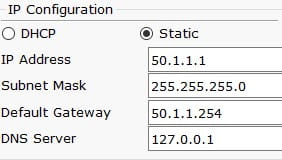
为服务器配置IP地址和网关

配置路由器

先升级三层交换机的端口使其和路由器连接

1
2
3
4
5
sw0(config)#int f0/4
sw0(config-if)#no switchport
sw0(config-if)#ip add 60.1.1.1255.255.255.0
sw0(config-if)#no sh
sw0(config-if)#exit

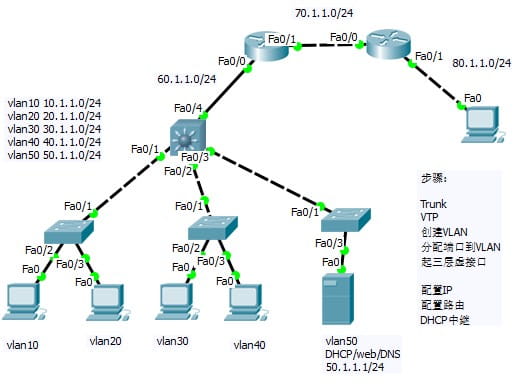
先为路由器配置IP地址,然后开始配置路由

三层交换机路由

三层交换机处于边缘位置,可以直接配置默认路由,其他的直连路由器必须配置静态路由,否则容易出现路由环路。

1
2
3
4
sw0>en
sw0#conf t
Enter configuration commands, one per line. End with CNTL/Z.
sw0(config)#ip route 0.0.0.0 0.0.0.0 60.1.1.2

其他路由器

以r1为例

1
2
3
4
5
6
7
8
9
r1>en
r1#conf t
Enter configuration commands, one per line. End with CNTL/Z.
r1(config)#ip route 10.1.1.0 255.255.255.0 60.1.1.1
r1(config)#ip route 20.1.1.0 255.255.255.0 60.1.1.1
r1(config)#ip route 30.1.1.0 255.255.255.0 60.1.1.1
r1(config)#ip route 40.1.1.0 255.255.255.0 60.1.1.1
r1(config)#ip route 50.1.1.0 255.255.255.0 60.1.1.1
r1(config)#ip route 80.1.1.0 255.255.255.0 70.1.1.2

r2也是边缘路由器,直接配置默认路由

1
2
3
4
Router(config-if)#
Router(config-if)#
Router(config-if)#exit
Router(config)#ip route 0.0.0.0 0.0.0.0 70.1.1.1

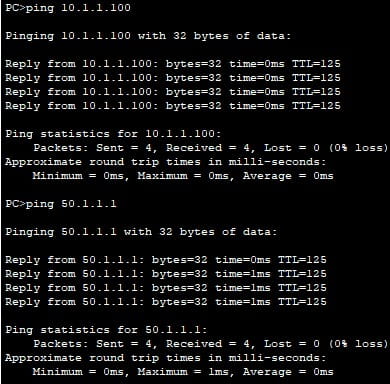
完成后全网互通,并解决了单臂路由分割VLAN的缺点。