单臂路由
单臂路由的作用
单臂路由可以使互相隔离的VLAN通信,而VLAN又隔离了广播域,从而解决了广播域过大的危害。
单臂路由是指在路由器的一个物理接口上通过配置子接口(虚拟接口)的方式,实现原来相互隔离的VLAN之间的互相通信。使用虚拟端口是为了防止端口过多,如果每一个VLAN都配置一个物理接口,也可以实现VLAN间的通信,甚至不需要trunk标签,但如果VLAN过多就不能这样做了。
配置的虚拟端口数取决于VLAN区域的数量。
- 单臂路由的缺点
- 网络瓶颈
- 容易发生单点物理故障(所有的子接口依赖于总物理接口)
- VLAN间通信的每一个数据帧都进行单独路由
拓扑图如下:
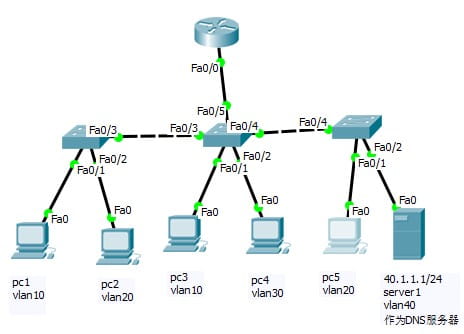
上图中,pc1和pc2在物理上处于同一网段,但处于两个不同的VLAN区域,交换机会丢弃不在一个VLAN区域的数据帧,所以无法通信。跨VLAN通信只有依靠路由器实现。
命令
暂时不配IP地址,在下面会部署DHCP服务器,将DNS服务器配置静态IP40.1.1.1/24
sw1配置过程
1
2
3
4
5
6
7
8
9
10
11
12
13
14
15
16
17
18
19
20
21
22
23
24
25
26
27
28
29
30
31
32
| Switch>en
Switch#conf t
Enter configuration commands, one per line. End with CNTL/Z.
Switch(config)#ho sw1
sw1(config)#vlan 10
sw1(config-vlan)#name v10
sw1(config-vlan)#exit
sw1(config)#vlan 20
sw1(config-vlan)#name v20
sw1(config-vlan)#exit
sw1(config)#vlan 30
sw1(config-vlan)#name v30
sw1(config-vlan)#exit
sw1(config)#vlan 40
sw1(config-vlan)#name v40
sw1(config-vlan)#exit
sw1(config)#vtp mode server ;设置为vtp服务器
Device mode already VTP SERVER.
sw1(config)#vtp domain d1 ;设置域名
Changing VTP domain name from NULL to d1
sw1(config)#vtp password 123.com ;vtp密码
Setting device VLAN database password to 123.com
sw1(config)#int f0/1 ;配置静态vlan
sw1(config-if)#switchport access vlan 10
sw1(config-if)#exit
sw1(config)#int f0/2
sw1(config-if)#switchport ac vlan 20
sw1(config-if)#exit
sw1(config)#int f0/3
sw1(config-if)#sw mode trunk ;将此端口设置为中继链路
sw1(config-if)#exit
sw1(config)#do sh vl b
|
sw2配置为vtp客户端
1
2
3
4
5
6
7
8
9
10
11
12
13
14
15
16
17
18
| Switch>en
Switch#conf t
Switch(config)#int range f0/3-5 ;范围命令,全部设置为中继链路
Switch(config-if-range)#switchport mode trunk
Switch(config-if-range)#exit
Switch(config)#vtp mode client ;将此端口设置为vtp客户端
Setting device to VTP CLIENT mode.
Switch(config)#vtp domain d1
Domain name already set to d1.
Switch(config)#vtp password 123.com
Setting device VLAN database password to 123.com
Switch(config)#int f0/1 ;静态vlan配置
Switch(config-if)#sw ac vl 10
Switch(config-if)#exit
Switch(config)#int f0/2
Switch(config-if)#sw ac vl 30
Switch(config-if)#exit
Switch(config)#
|
路由器命令
在f0/0开4个虚拟接口,分别配置IP地址,子网掩码,并设置trunk标签的封装类型
1
2
3
4
5
6
7
8
9
10
11
12
13
14
15
16
17
18
19
20
21
22
23
24
25
26
| Router>en
Router#conf t
Enter configuration commands, one per line. End with CNTL/Z.
Router(config)#int f0/0.1
Router(config-subif)#encapsulation dot1q 10 ;设置trunk标签的封装类型和VLAN的ID
Router(config-subif)#ip add 10.1.1.254 255.255.255.0
Router(config-subif)#no sh
Router(config-subif)#exit
Router(config)#int f0/0.2
Router(config-subif)#encapsulation dot1q 20
Router(config-subif)#ip add 20.1.1.254 255.255.255.0
Router(config-subif)#no sh
Router(config-subif)#exit
Router(config)#int f0/0.3
Router(config-subif)#encapsulation dot1q 30
Router(config-subif)#ip add 30.1.1.254 255.255.255.0
Router(config-subif)#no sh
Router(config-subif)#exit
Router(config)#int f0/0.4
Router(config-subif)#encapsulation dot1q 40
Router(config-subif)#ip add 40.1.1.254 255.255.255.0
Router(config-subif)#no sh
Router(config-subif)#exit
Router(config)#int f0/0
Router(config-if)#no sh ;打开物理接口
Router(config-if)#exit
|
DHCP
部署DHCP服务器有两种方式,在小型网络中(1000人以下的网络)可以直接将路由器部署为DHCP服务器,中大型网络中需要单独部署DHCP服务器。此处使用40.1.1.1/24作为DHCP服务器,但它和其他终端不在一个VLAN区域,无法收到广播包,这就需要DHCP中继了
在三层路由器上部署DHCP服务器
DHCP地址池可以随意命名,路由器通过默认路由来分配IP地址。
1
2
3
4
5
6
7
8
9
10
11
12
13
14
15
16
17
18
19
20
| Router>en
Router#conf t
Router(config)#ip dhcp excluded-address 10.1.1.1 10.1.1.99 ;全局排除IP地址
Router(config)#ip dhcp excluded-address 20.1.1.1 20.1.1.99
Router(config)#ip dhcp excluded-address 30.1.1.1 30.1.1.99
Router(config)#ip dhcp pool v10
Router(dhcp-config)#network 10.1.1.0 255.255.255.0 ;设置网段
Router(dhcp-config)#default-router 10.1.1.254 ;此dhcp地址池的默认路由
Router(dhcp-config)#dns-server 40.1.1.1 ;dns服务器地址,静态配置
Router(dhcp-config)#exit
Router(config)#ip dhcp pool v20
Router(dhcp-config)#network 20.1.1.0 255.255.255.0
Router(dhcp-config)#default-router 20.1.1.254
Router(dhcp-config)#dns-server 40.1.1.1
Router(dhcp-config)#exit
Router(config)#ip dhcp pool v30
Router(dhcp-config)#network 30.1.1.0 255.255.255.0
Router(dhcp-config)#default-router 30.1.1.254
Router(dhcp-config)#dns-server 40.1.1.1
Router(dhcp-config)#exit
|
DHCP中继
DHCP中继就是为了解决DHCP服务器和终端之间跨VLAN通信的问题,在中大型网络中一般会将服务器都设置在同一VLAN。
配置DHCP中继后网关收到广播包后会单独发送一个单播数据帧给DHCP服务器,也就是40.1.1.1/24,由于路由器有4个虚拟接口,在每一个接口上都要配置,f0/0.4不需要,DHCP服务器单独处于一个VLAN区域,怎么配置DHCP服务器就不写了
命令:
1
2
3
4
5
6
7
8
9
10
11
| Router>en
Router#conf t
Router(config)#int f0/0.1
Router(config-subif)#ip helper-address 40.1.1.1
Router(config-subif)#exit
Router(config)#int f0/0.2
Router(config-subif)#ip helper-address 40.1.1.1
Router(config-subif)#exit
Router(config)#int f0/0.3
Router(config-subif)#ip helper-address 40.1.1.1
Router(config-subif)#exit
|
配置完成后所有主机都能访问到DHCP服务器,而且互相之间通过VLAN隔开,避免了广播域的危害
面试题
一个容易考到的面试题,要求在不添加路由器的情况下使10.1.1.1和10.1.1.2能直接通信
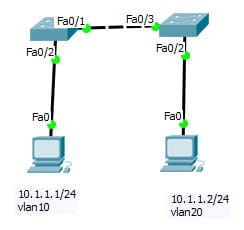
主要问题是如何让10.1.1.1的数据帧从f0/1出去。交换机通过VLAN表判断数据帧来自哪个VLAN区域,只需要将f0/1添加到vlan10,将f0/3添加到vlan20就可以了,此时sw2收到数据帧后通过VLAN表会判断出此数据帧来自vlan20。

 微信